Building a Harness: How I Got Agents to Verify Their Own Code
I wanted to see how far I could push autonomous code generation. Not by writing better prompts, but by building a system where agents could implement, verify, and fix their own work without me watching. A DOCX editor built from behavioral specs and pixel diffs was the testbed.
Building a Harness: How I Got Agents to Verify Their Own Code
I wanted to see how far I could push code generation without ever understanding what the agents were writing.
Not better prompts. Not smarter models. A different problem entirely: how do you build a system where agents can generate code, see what they built, decide if it’s wrong, and fix it themselves?
The hard part wasn’t getting agents to write code. It was building a system where they can tell if the code is correct.
The testbed was a web-based DOCX editor. Parsing Office Open XML, resolving style chains, laying out text with proper font metrics, rendering to canvas. The OOXML spec alone is over 6,000 pages.
The result after a week: a working DOCX viewer that matches LibreOffice quite well on the demo.docx I was testing against (a complex document with tables, lists, images, text formatting, drop caps, and more). Basic editing also works in normal documents. But the DOCX editor was never really the point. The point was the harness around it.
The Problem: Who Watches the Watcher?
The standard workflow for AI-assisted coding is some version of:
- You write a prompt
- The agent generates code
- You look at the code and decide if it’s right
- You tell the agent what to fix
- Repeat
You are the verification layer. Every cycle goes through you. This works fine for small tasks, but it doesn’t scale. If you want agents to implement an entire project, you can’t be the bottleneck in every feedback loop.
The question I kept coming back to was: what if the agent could verify its own output? Not just “does the code compile?” but “does the result look correct?”
Solve that, and you stop being the reviewer. You become the person who sets up the process and lets it run.
Specs as Contracts
The first decision was how to organize the work. I didn’t want agents to just “build a DOCX editor.” That prompt is too vague. Different agents would make different architectural decisions, and there would be no consistency.
Instead, I split the project into behavioral specs. Each spec describes what a module should do, not how it should do it. A spec for ZIP parsing describes the interface, the expected behavior for valid and invalid ZIPs, and test cases with expected inputs and outputs. No implementation details, no reference to any existing codebase.
An agent implementing a spec never sees reference code. It only sees the behavioral description and must figure out the implementation on its own.
The project ended up with 103 specs covering the full pipeline:
.docx file → ZIP Parse → XML Parse → Document Model
                                         ↓
                                    Style Resolution
                                         ↓
                                    Layout Engine
                                         ↓
                                    Canvas Renderer
                                         ↓
                                    [Editing ← Selection ← Input]
                                         ↓
                                    [History / Undo-Redo]
Each spec follows the same structure: TypeScript interfaces, behavioral descriptions, OOXML XML examples for context, and test cases with expected results. Here’s a simplified example from the styles spec:
Input:
  <w:style w:type="paragraph" w:styleId="Heading1">
    <w:name w:val="heading 1"/>
    <w:pPr><w:spacing w:before="240" w:after="120"/></w:pPr>
    <w:rPr><w:b/><w:sz w:val="32"/></w:rPr>
  </w:style>

Expected:
  parseStyles(xml) → {
    definitions: Map {
      "Heading1" → {
        type: "paragraph",
        name: "heading 1",
        paragraphProps: { spaceBefore: 240, spaceAfter: 120 },
        runProps: { bold: true, fontSize: 32 }
      }
    }
  }
This separation matters more than it first appears. The spec-generating agent and the code-generating agent work from the same contract. If the spec is wrong, both are wrong in the same way. If the spec is right, the code agent has everything it needs without ever asking me for clarification.
The Ralph Script: Fire and Forget
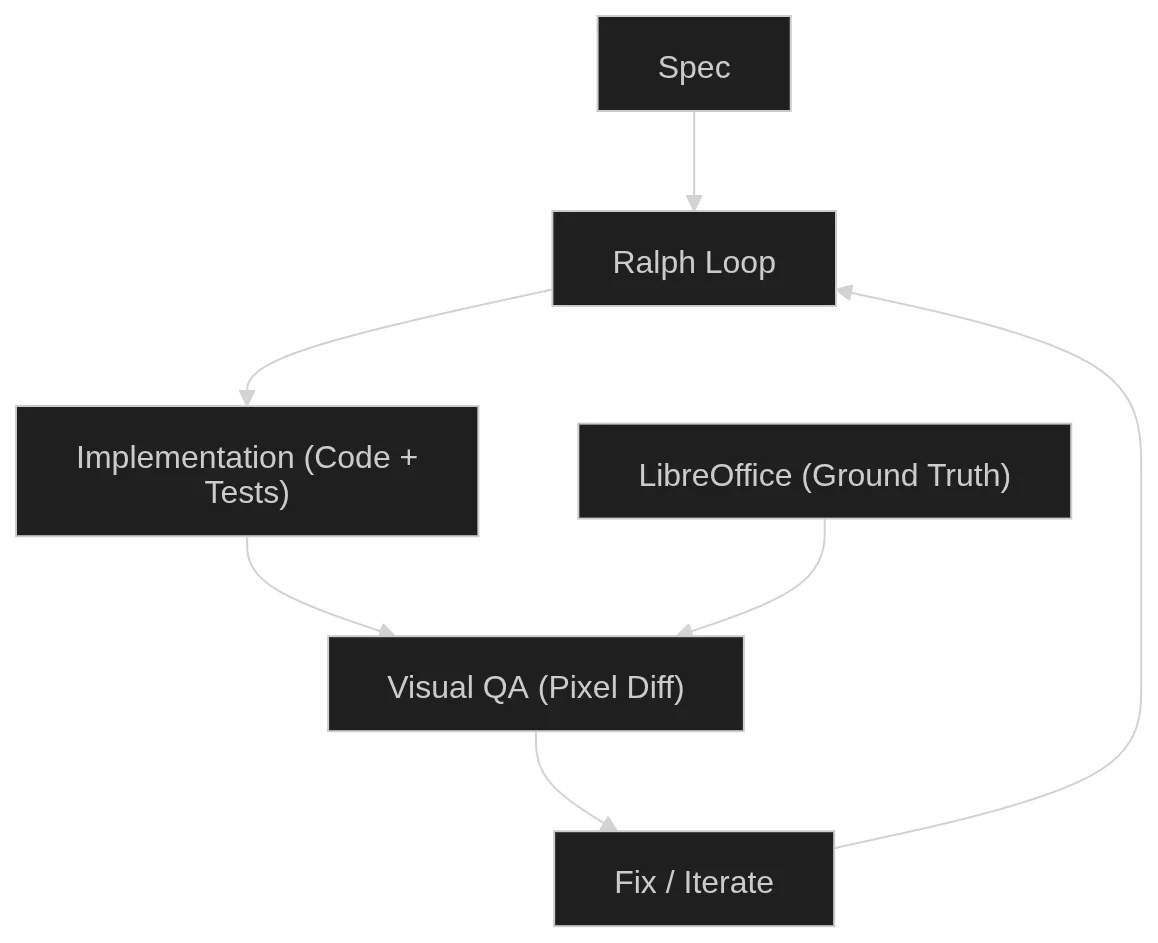
With specs in place, I needed a way to run the implementation loop. I wrote a bash script called ralph that takes a spec number and an iteration count:
./ralph 066 6 # implement spec 066, run 6 iterationsEach iteration does three things:
1. Implement. The agent reads the spec, reads a progress file tracking what’s been done, writes tests first, then implements the module to pass those tests. It runs pnpm test and pnpm run typecheck after each change. When it finishes a meaningful unit of work, it stops.
2. Visual QA. After implementation completes, the script automatically starts a visual verification pass. The agent loads a test DOCX in the browser, takes a screenshot of our renderer, generates a reference screenshot from LibreOffice, and compares them pixel by pixel. If there are visual differences, the agent fixes the code and re-verifies.
3. Cleanup. A final pass where another agent reads all the source files and applies code quality rules: remove unused imports, improve naming, simplify logic. No behavioral changes allowed.
After each iteration, the script auto-commits to git. If the iteration fails (agent exits with an error, or doesn’t produce the expected completion marker), it stops and shows the last output.
The key insight of ralph is that it treats agent time as cheap. An iteration might take 30 minutes or 4 hours. It doesn’t matter. I kick it off and do something else. I check back later and see if it finished. I wasn’t optimizing for speed per request. I was optimizing for keeping the loop running continuously.
This is where the model choice matters. I used two different models for two different jobs.
For specs and debugging: Codex. Fast, capable, but limited by my plan’s token cap. Good for the work that needs my attention and back-and-forth.
For implementation: GLM 5.1. Slower than state-of-the-art models, and its coding plan has poor concurrency. But the token limit is generous (100 million tokens per 5 hours), and with the poor concurrency I could never actually hit that cap even if I tried. The slowness didn’t matter because ralph scripts are fire-and-forget. I don’t need the answer now. I need the answer eventually.
Over the course of the week, GLM 5.1 alone consumed 1.4 billion tokens running ralph scripts. I don’t know the exact Codex usage, but I maxed out the weekly token limit on my Pro plan.
I also ran these from my phone. SSH via Termux meant I could start a ralph iteration while out, check if it finished, and queue the next spec. Morning and night I’d work on specs in parallel and debug harder issues. During the day I’d just kick off jobs from my phone and let them run.
But here’s also a catch. The harness only works if agents can verify their own work. And that verification layer didn’t exist on day one.
Giving Agents Eyes
The first specs were simple. ZIP parsing, XML reading, document model types. These don’t need visual verification. You write a test with input XML and expected output, the test passes or it doesn’t.
The problem started with rendering specs. How does an agent know if a table renders correctly? Unit tests can verify that the layout engine produces the right dimensions, but they can’t tell you if the text is actually visible on the canvas.
My first attempt was giving agents Chrome DevTools via MCP. Now the agent could open the dev server and interact with the browser. But the DOCX viewer uses <canvas>, and the accessibility tree doesn’t show what’s painted on a canvas. The agent could see the page structure but not the rendered document.
Then I added image understanding. An MCP tool that lets the agent take screenshots and analyze them. Now it could see the rendered output. But seeing your own output isn’t enough. You need to know what it should look like.
That’s where LibreOffice comes in. I built a pixel diff pipeline that:
- Takes a DOCX file and renders it headlessly in LibreOffice (the ground truth)
- Captures reference screenshots at 96 DPI
- Loads the same DOCX in our renderer via Playwright
- Captures our screenshots
- Runs pixelmatch to compute per-page mismatch percentages
- Generates diff images where red pixels indicate differences
The pipeline is packaged as an opencode skill so agents can use it:
# One-command visual check
cd /home/sami/coding/open-docx && \
bash .opencode/skills/visual-docx-diff/gen-references.sh demo.docx && \
node .opencode/skills/visual-docx-diff/capture-our-renderer.cjs --docx demo.docx && \
node .opencode/skills/visual-docx-diff/pixel-diff.cjs --ref /tmp/docx-ref/demo
Output looks like:
Page 1: 4.21% [WARN]  (816x924)
Page 2: 8.63% [FAIL]  (816x924)
Page 3: 15.10% [FAIL]  (816x924)
Overall: 9.14% mismatched
Under 5% mismatch is usually anti-aliasing differences. Over 5% means a real rendering bug. The agent gets the diff images and can see exactly which pixels are wrong.
But having the tool isn’t the same as knowing how to use it. I also created skills that teach the agent the visual TDD workflow: generate a test DOCX with python-docx that exercises a specific feature, render it in LibreOffice for reference, load it in our viewer, compare, fix if needed, repeat.
This progression is the core of the harness:
- Blind agents: code generation only, you verify everything
- Agents with a browser: can interact with the page but can’t see canvas content
- Agents with eyes: can take screenshots and analyze them
- Agents with a ground truth: can compare their output pixel-by-pixel against a known-correct reference
Each step reduced how much I needed to be involved. But it’s not like the agent could fully replace my judgment. It was good at catching obvious problems and finding issues that could then be turned into new specs. But things like table gridlines not showing, or subtle spacing being off, still needed me to look at the output and steer the agent. The visual QA got me maybe 70% of the way there on its own. The remaining 30% still required human eyes.
What Surprised Me
The biggest surprise was that specs sometimes couldn’t capture enough architecture. Early specs described individual modules well, but the interactions between modules (how style resolution feeds into layout, how layout feeds into rendering) were harder to spec in isolation. Sometimes the agent would implement a spec correctly but the integration would fail because the spec didn’t account for some cross-cutting concern. The fix was generating new specs that described the integration behavior. First do a simple implementation, then refactor into something better. Normal software development, just with agents.
Visual QA caught most rendering bugs, but not all. Some problems are inherently hard for the agent to see. Subtle alignment differences that a human would notice immediately but the agent dismisses as “close enough.” In those cases I still had to steer the agent by pointing at the specific issue.
The result is more viewer than editor, if I’m being honest. Basic typing works in normal documents, but complex editing scenarios still have rough edges.
But the process worked. Here’s the viewer rendering a complex test document compared to LibreOffice:
The Token Usage
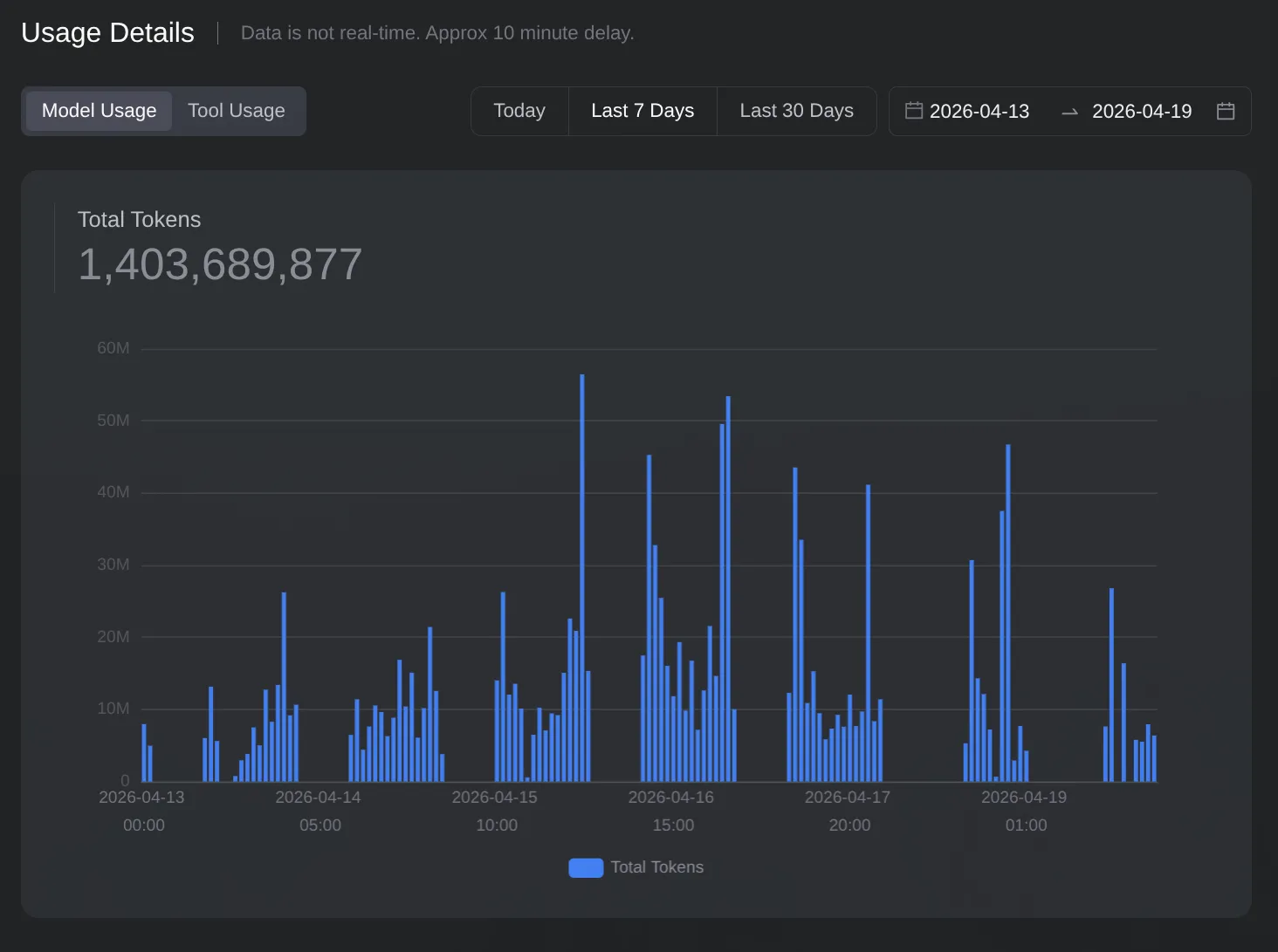
This chart shows GLM 5.1’s token consumption over the week. 1.4 billion tokens from this model alone, on top of maxing out the Codex Pro plan’s weekly limit. The usage is almost constantly on, with large spikes at morning and night when I was parallelizing agents and debugging harder issues, and steadier usage during the day when ralph scripts were just running in the background.
What made this economics work was the asymmetry between token availability and concurrency. The model could handle enormous jobs given enough time, but it couldn’t run many jobs in parallel. That meant I never hit the token cap, and every job I queued would eventually finish. The constraint was patience, not budget.
The increase in token usage wasn’t inefficiency. It reflected that the agent was doing more of the work I previously did manually.
Conclusion
The models are already good enough to generate code. What was missing for me was the harness: the system that lets agents verify their own work without a human in the loop.
Building that harness is a progressive process. You start with agents that can write code, then you give them tools to test it, then you give them eyes to see it, then you give them a ground truth to compare against. Each addition makes the system more autonomous and reduces your role from reviewer to orchestrator.
The DOCX editor proves this works for a non-trivial project. Not perfectly, but well enough to be useful. And the approach generalizes to any project where you can define behavioral specs and compare output against a reference. If you can’t measure correctness automatically, the loop breaks. But when you can, agents can run for hours without you.