Prompt Optimization Shouldn't Require Rewriting Your App
How come we have advanved agent tracing products with minimal setup, but prompt optimization itself needing rewriting your product in new frameworks in order to work. My attempt on showing that it does not need to be the case
Prompt Optimization Shouldn’t Require Rewriting Your App
There’s still a missing link in the LLM application stack.
We’va nailed the visibility layer. Platforms like Langfuse and Braintree make it trivial to add traces, evals and performance monitoring to the application. Just couple of lines to your system is sufficient to get the most basic tracing functionality, while also giving possibility for advanced features like custom metrics.
We have also created solutions to the prompt exploration layer. Research shows that prompt optimization techniques like GEPA can make the prompts better. But they usually used behind the frameworks such as DSPy with their own way for creating agents and LLM calls.
But having good visbility and making the system optimized is still hard as there is nothing that can automatically translate between traced LLM flow to the code that needed to optimize that given flow. I will argue that prompt optimization should live in your system architecture, just like the visbility layer does, and show that this can be done by using the state-of-the-art prompt optimizers automatically.
In this blog I argue that prompt optimization should live inside the application architecture itself, and show how this is done by utilizing the traced LLM systems. This way prompt optimization is no more something you need to create, it’s something you need to plug in, just like the observability layer.
Why Current Tools Still Don’t Close the Gap
Modern observability tools like Langfuse already contain most of the primitives required for prompt optimization. Integration is lightweight and runs directly inside your existing architecture, usually wrapping your LLM client or just putting some metadata information, so to the client can make the basic tracing work. Here’s example of how Braintrust handles tracing:
import { initLogger, wrapOpenAI } from "braintrust";
import OpenAI from "openai";

const logger = initLogger({ projectName: "My Project" });
const client = wrapOpenAI(new OpenAI());

// All calls are automatically logged
const response = await client.chat.completions.create({
  model: "gpt-4o",
  messages: [{ role: "user", content: "Hello!" }],
});
As the tracing itself become trivial, these platforms started adding new features like prompt version control, evaluations and metrics. These are still very straightforward to configure, as we already wrap the the whole LLM call with out client. We know both the input and output, so we can keep track of what prompts there are in the system (prompt version control), and can compare the outputs to some metrics (evals).
Langfuse also contains feature “Prompt Experiments” which tests different prompts (from the prompt version management) and compares them by your metrics. These advanced features usually need dataset configured and couple prompts in the system to compare with.
This still stops short of actual optimization. The tools only compare their own known prompts, and will not iterate itself to create better prompts based on the results.
On the other hand, prompt optimizers itself are not pluggable to the current system like we have for observability. The underlying loop is nearly identical to the advanced features of the observability platforms. You need to know how the system is doing on the prompts (evals) by defining metrics. Then you need to compare these different versions (prompt versioning) to choose the best candidates for the prompt mutation.
The important part is that these prompt optimization platforms / packages know how to also mutate the prompts. And they have become quite good for this task. But as it needs to mutate the prompt, it also needs way to run the LLM calls to evaluate them. As their goal has been on only on this single feature, the easiest solution architecturally was that user needs to run the optimization in their own machine using their prompt optimization framework specific way for defining the flow.
The optimizer cannot operate directly on your existing runtime. You must re-express the same LLM flow in the framework’s native format, effectively duplicating your program outside the application.
from typing import List, Literal


class FacilitySupportAnalyzerUrgency(dspy.Signature):
    """
    Read the provided message and determine the urgency.
    """
    message: str = dspy.InputField()
    urgency: Literal['low', 'medium', 'high'] = dspy.OutputField()

class FacilitySupportAnalyzerSentiment(dspy.Signature):
    """
    Read the provided message and determine the sentiment.
    """
    message: str = dspy.InputField()
    sentiment: Literal['positive', 'neutral', 'negative'] = dspy.OutputField()

class FacilitySupportAnalyzerCategories(dspy.Signature):
    """
    Read the provided message and determine the set of categories applicable to the message.
    """
    message: str = dspy.InputField()
    categories: List[Literal["emergency_repair_services", "routine_maintenance_requests", "quality_and_safety_concerns", "specialized_cleaning_services", "general_inquiries", "sustainability_and_environmental_practices", "training_and_support_requests", "cleaning_services_scheduling", "customer_feedback_and_complaints", "facility_management_issues"]] = dspy.OutputField()

class FacilitySupportAnalyzerMM(dspy.Module):
    def __init__(self):
        self.urgency_module = dspy.ChainOfThought(FacilitySupportAnalyzerUrgency)
        self.sentiment_module = dspy.ChainOfThought(FacilitySupportAnalyzerSentiment)
        self.categories_module = dspy.ChainOfThought(FacilitySupportAnalyzerCategories)

    def forward(self, message: str):
        urgency = self.urgency_module(message=message)
        sentiment = self.sentiment_module(message=message)
        categories = self.categories_module(message=message)

        return dspy.Prediction(
            urgency=urgency.urgency,
            sentiment=sentiment.sentiment,
            categories=categories.categories
        )

program = FacilitySupportAnalyzerMM()
Notice that you need to both change your way to define prompts and create the same LLM flow again in this DSPy native way in order to use the prompt optimizers. Or you could custom implement optimizer adapters that could work with your system, but that also needs a lot of configuration to make the system work.
At a structural level, observability and prompt optimization are almost the same loop: track prompt variants, evaluate outputs, compare results, and select better candidates. The difference is that observability stops at visibility, while optimization requires rewriting the system. If the primitives of optimization are already in the observability layer, the missing piece is not a new optimizer, but a way to apply optimization algorithms straight in the application runtime behaviour. This is the direction I will explore.
Optimization in YOUR System
First, we need to understand the requirements.
Prompt optimization must run inside your existing application architecture. This means the optimizer needs a way to call your service and trigger the real LLM flow. The key point is that we do not want to generate or redefine the application twice. We need a way to reuse the existing system and make the optimizer flexible enough to operate within it.
Second, prompts are no longer only written by the user. The optimizer must be able to execute candidate prompt variants inside the user’s system. Traditional observability platforms allow prompts to be stored and versioned, but those prompts are still defined manually by the developer. In this case, prompts can also originate from the optimization algorithm.
Finally, the results of each run must be available for evaluation. This part is already well handled by observability platforms and is relatively straightforward.
Architecture
Observability Layer
The foundation of the system is the observability layer. As discussed earlier, modern observability platforms already provide most of the primitives required for prompt optimization. Instead of competing with tools like Langfuse or Braintrust, I implemented only the capabilities necessary to make runtime optimization possible:
- Traced LLM calls
This is most improtant part of the application, I need to know what is sent, and what gets out when I run the application.
- Prompt slots
Optimization also needs way to keep track of the prompts, especially when we actually start optimizing. We need versioning for the every prompt in the system in order for us to know how different prompts are doing in the system. Once we have this information, we can actually start comparing the results and generate better prompts.
- Metrics / evals
These also very production-ready feature in the observability platforms. We need to know how to compare our prompt variants, so we need also this feature.
- Datasets
Many platforms also offer datasets, but for our use-case this is a must feature. As prompt optimization won’t really work without datasets that we can run.
Basically, I needed to implement basic LLM observability platform with these capabilities, as without these, we can’t start optimising the prompts.
Replayable Execution
Unlike frameworks such as DSPy, the optimizer in this system runs against the user’s real application.
This means the optimizer must be able to re-run flows. Observability platforms passively record traces, but optimization requires active execution. The system must trigger the same flow that production uses, without duplicating environments or introducing complex configuration.
The goal is minimal overhead: enabling optimization should not require rewriting the application.
Safe Prompt Injection
Replayable execution implies controlled prompt injection.
The optimizer generates prompt variants and those variants must be executed inside the user’s system. Instead of the developer manually editing prompts, the optimizer sends candidate overrides to the application.
This introduces security considerations, since the system now accepts externally generated prompt mutations. To address this, each optimization flow exposes a dedicated endpoint secured with a private token. Only authenticated optimization requests are allowed. Conceptually, this is similar to public/private key authentication.
Optimization Engine
The system also needs an engine capable of generating prompt candidates.
There are several prompt optimizers available. I chose GEPA and implemented a custom version adapted to this runtime architecture. The implementation is conceptually close to the official GEPA approach, with simplifications to make it work seamlessly with prompt variants inside an existing application.
The optimization logic remains the same:
- Generate candidate prompts
- Evaluate them
- Maintain a Pareto frontier
- Use feedback to generate stronger candidates
The difference is not in the algorithm, but in where execution happens.
The Closed Optimization Loop
So how does our system works?
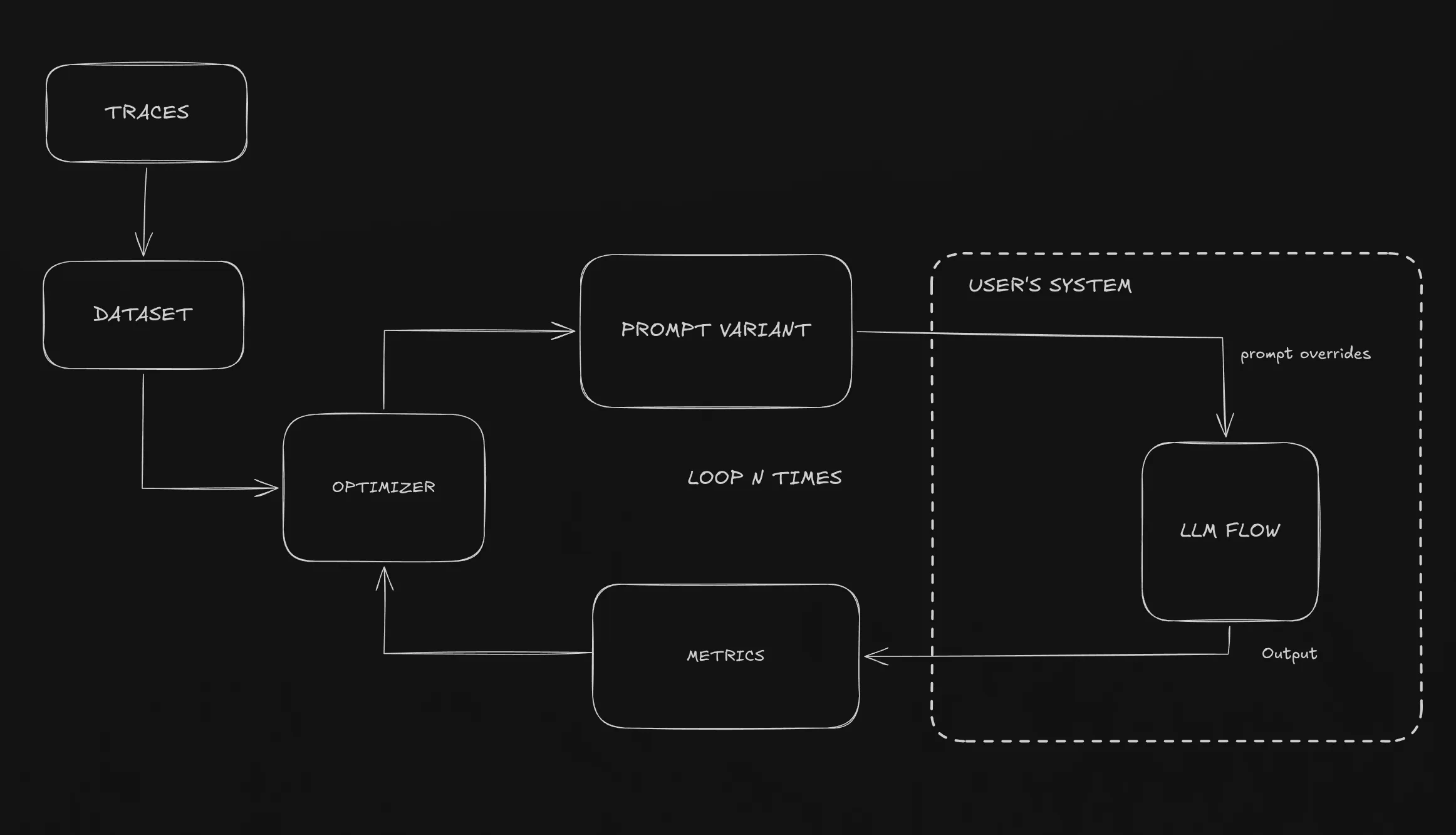
Here’s simple way to understand it:
- Real executions are traced (observability) —> the traced calls can be added to datasets
- Flow (traces) contain metrics that are evaluated for each trace
- Optimizer is run with the dataset (from the traces or own created dataset)
- Optimizer generates prompt variant
- Prompt variant is executed in the user’s system —> output is the defined metric values
- Best variants are promoted
- The variant cretion —> executing user’s system loop repeats continually
Instead of executing LLM calls inside a separate optimization framework, the optimizer runs the real application. Datasets often originate from actual production traces, and all model calls happen inside the user’s system.
Optimization is no longer an external process. The optimizer does not simulate the system, it runs the real system.
Snippet 1 - Optimization calls the same flow
export const POST = createOptimizationRoute({
  metrics: [
    { name: "f1", evaluate: ({ output, expected }) => calculateF1(output, expected) },
  ],

  evaluate: async (evalPrompt, promptOverrides) => {
    const client = buildOptimizerClient().client
      .withPromptOverrides(expandCombinedPrompts(promptOverrides));

    // Same production flow — no rewrite required
    const result = await runVariableExtractionFlow(client, evalPrompt.input_text);
    return result.extractedHtml;
  },
});
Every flow needs its own optimization route, that my prompt optimizer can call with prompt overrides. Basically my prompt optimiser sends two information to run the system: the user prompt, and the prompt overrides that are then used as promts.
Different optimizations use different metrics, I allow custom metrics to be defined in the metrics array, or you can use ready-made metrics by toggling them on my web service (e.g. LLM-as-Judge).
The important part is the runVariableExtractionFlow which is the same code for both the optimizer and the overall user’s system. No duplication needed. The evaluate only needs some string result so we can
evaluate it with the metrics.
Snippet 2 - Prompt overrides
const systemPrompt = client.renderPrompt(ExtractPrompt, { text: documentText });

const completion = await client.chatCompletion({
  model: "...",
  messages: [{ role: "system", content: systemPrompt }],
});
Another improtant part of how the system works is prompt overrides. We have created a special LLM client with additional capabilities with the prompts.
Basically, we have prompt templates like ExtractPrompt
export const ExtractPrompt = definePrompt({
  id: "extract.system",
  flowName,
  stepName: "extract-variables",
  role: "system",
  description: "Extracts variables from documents using <variable> tags",
  template: `Extract variables from this document. Wrap extractable information in <variable> tags.
Input text: {text}`,
  schema: z.object({}),
  tags: { type: "eval-set", value: "real-contracts-sample" },
});
That is how we define prompts, and by using the renderPrompt we can override the prompt with the prompt override coming from the prompt optimizer, while making it possible to replace values that change in every request.
What This Enables
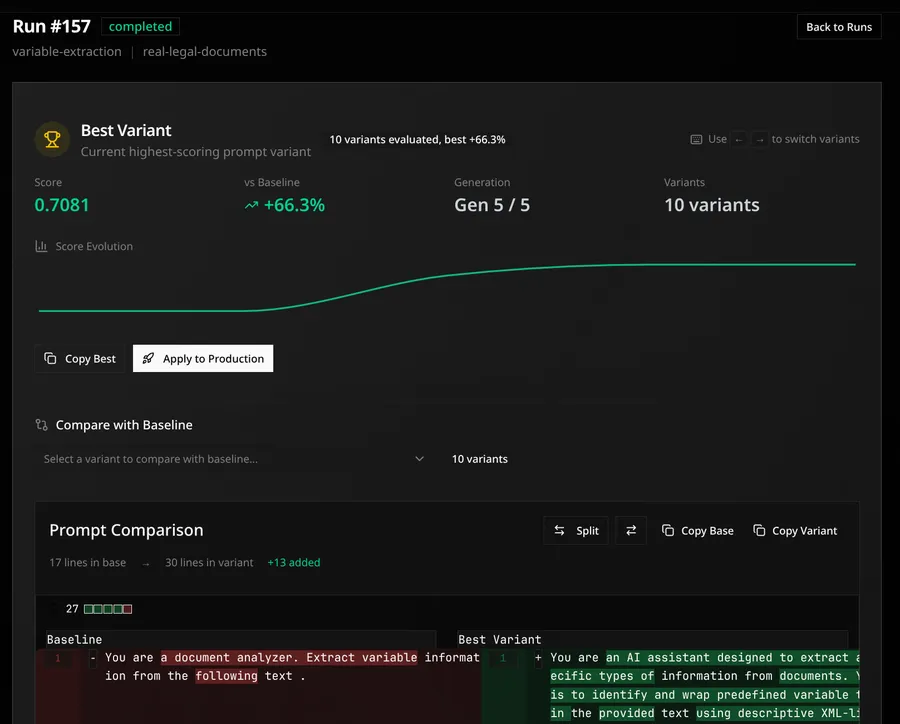
Here’s example of prompt optimization output: I created an variable extraction LLM pipeline, where agent was given simple prompt to find variables from text documents. In the code, I created custom metric for f1 score for found variables, that my optimizer optimized. The baseline prompt vs. the optimizes prompt is shown below. The improvement was from the baseline score 0.4295 to 0.7081! Over 60% improvement to the baseline!
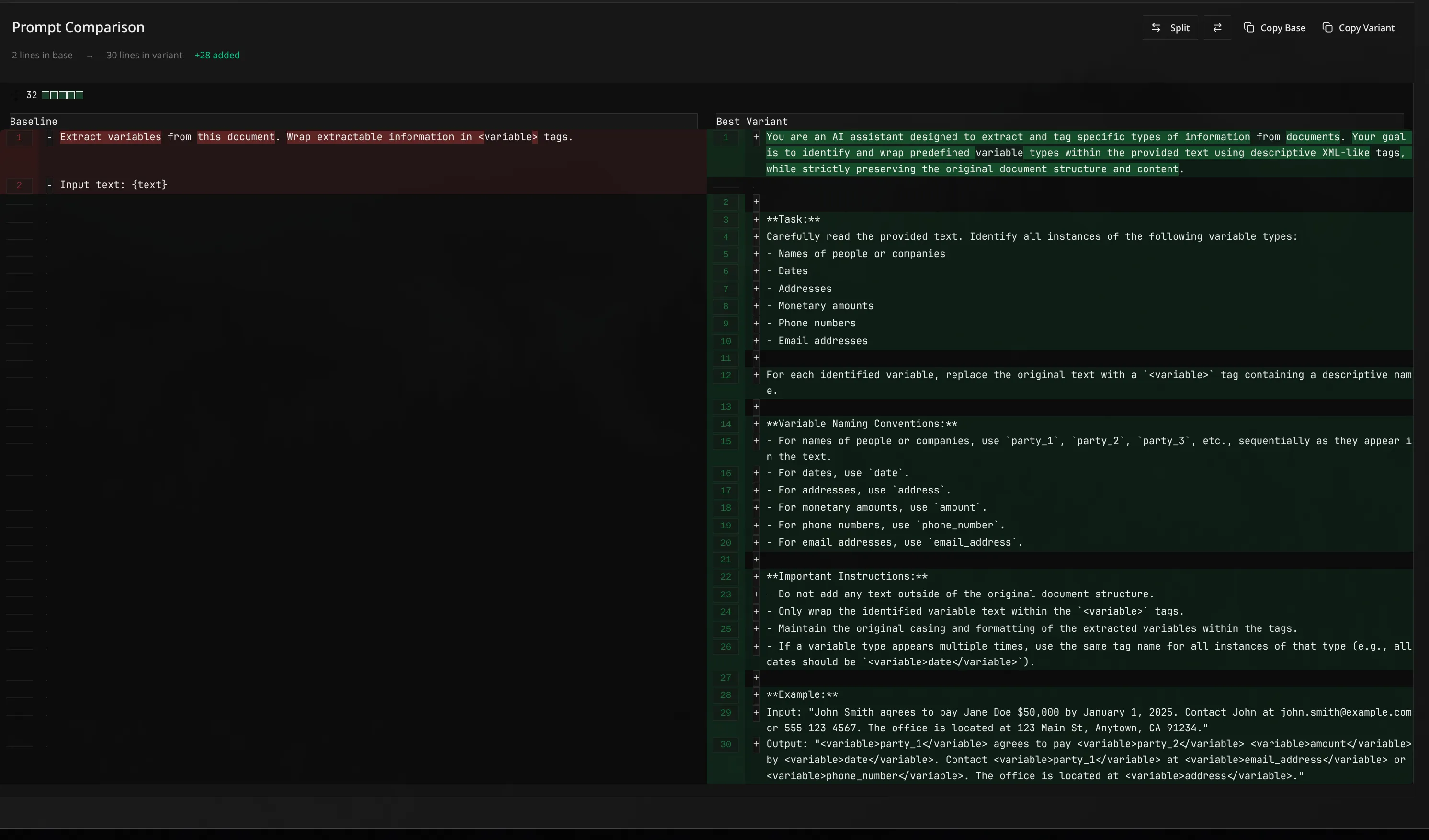
Moving the prompt optimization from the frameworks inside to runtime, prompt optimization stops being an isolated experiment that needs large amount of configuration .
I think the improvement and the speedup to run the optimization is huge! Variants execute in the real application thus the actual datasets also can be generated from the traces, optimization can run continuoysly and there’s no need for separate evaluation environments.
There is no framework lock-ins, I just need to implement SDK client that works for diffferent AI providers (for this project, I just created one for openrouter and openai). But apart from that, user just needs to wrap their prompts in the prompt override template, and create route where optimizer can call your system!
Also the traces becoming the dataset makes it so easy to test the system on real user inputs. Usually in prompt optimization we generate custom datasets (which can lso be done with my system!) that then used to optimize. But due to now prompt optimziation runnning in runtime, the actual traces can be added to the dataset with single click!
This also removes production drift. Prompt variants are evaluated under the same condition as real traffic, with same dependencies and orchestration layers. Doing code changes to the logic autoamtically then optimizes your new code.
Finally, optimization becomes modular, you are not forced to change your code to work with different optimization algorithms. What we only need is generate new prompt optimizer that generates new variants, the end user doesn’t need to care anythign about that. The optimizers become modular choices without users ever needing to alter their applciation for the prompt optimization, the prompt optimization alters it to the user’s system!
Prompt optimization moves from research workflow to the runtime infrastructure.
Some Personal Notes
Creating this project has taken some time, but has also made me really belief this approach won’t stop for here. I have enough personal experience on creating DSPy prompt optimization that I can now really see the vision of prompt optimization in your own system becoming at some point reality.
This project is just proof-in-concept that this is possible to do, but already alleviates the pain-points of prompt optimizatio.
What I have found very useful that I did not think before implementing was actually the datasets. Most of the time I had spent on prompt optimization was preparing data, finding good datasets etc. But now, this project made me realize that the data should come from the user.
Recently, GEPA has also introduced optimize_anything api that has some similar thoughts on optimization: you only need string and evalaute function to start optimizing!
This system is similar, you only need your prompts + metrics to start optimizing. You shouldn’t need anything else to optimize, e.g. how to generate the DSPy signatures, how to gather the data, how to define metrics. These should be made either frictionless or dont’t have them at all. I’ll keep working on this proejct, there’s still so much to explore.